
The Biggest Claude-Credit Trap: Making AI Re-Read the Whole PRD
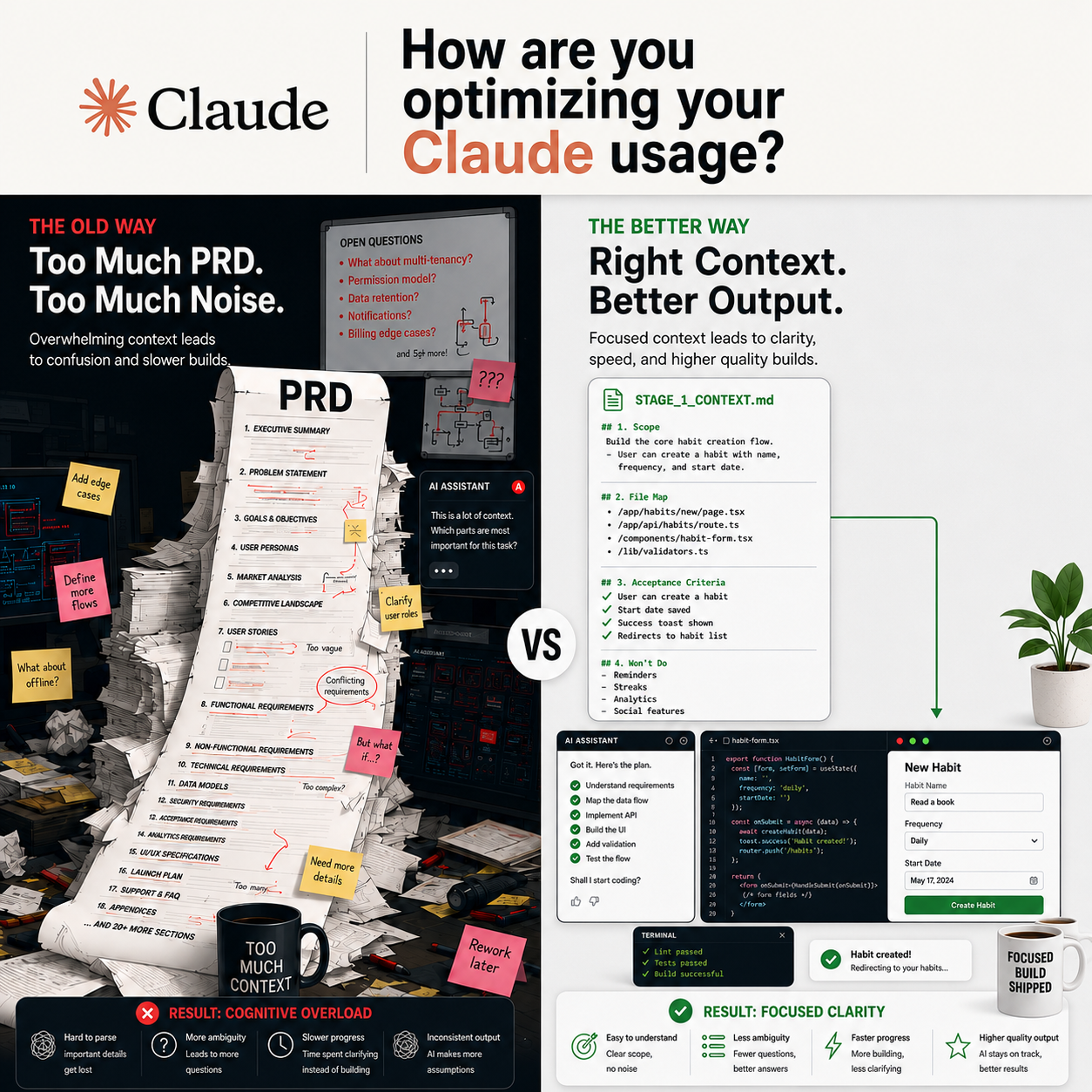
One of the easiest ways to burn through Claude credits is asking it to read the whole PRD every time.
At first, it feels like the right thing to do. The PRD has the vision, requirements, product logic, user flows, technical notes, edge cases, and future ideas. So every time you start a new task, the instinct is to say, “Read the full PRD first.”
But that becomes a trap.
A full PRD is useful for understanding the product. It is not always useful for executing one small stage of work. Once you are building a specific slice, Claude does not need the whole product story every time. It needs the right context for the task in front of it.
That is where a short STAGE_1_CONTEXT.md file helps.
Instead of making Claude re-read the full PRD, create a focused stage file with only four things:
Scope: What this stage is responsible for.
File map: Which folders or files Claude should work in.
Acceptance criteria: What must be true when the stage is complete.
Won’t list: What Claude should avoid for now.
This keeps Claude from wandering. It also protects your credits because you are not paying for the same long-context review again and again.
For example, imagine a PRD for a typical task management app. The full PRD might include onboarding, user accounts, project boards, task creation, due dates, reminders, team permissions, analytics, and future AI suggestions.
But if Stage 1 is only about creating and editing a task, Claude does not need the entire roadmap. It only needs the boundaries for that stage.
A good STAGE_1_CONTEXT.md might say:
“Build the first task creation flow. Work only inside /features/tasks/ and related API wiring. Success means the user can create a task, edit the title and description, save changes, and see empty, loading, success, and error states. Do not add reminders, analytics, team permissions, AI suggestions, or dashboard reporting in this stage.”
That kind of context is smaller, clearer, and cheaper.
It also improves the quality of Claude’s output. When the context is too broad, Claude may overbuild, touch files it does not need to touch, or solve problems that belong to later stages. When the context is focused, it is easier to keep the work testable and contained.
The better workflow is simple:
Use the full PRD once to break the project into stages. Then ask Claude to create a short .md file for each stage. Each stage file becomes the source of truth for that part of the build.
So instead of prompting:
“Read the full PRD and build Stage 1.”
You can prompt:
“Use STAGE_1_CONTEXT.md as the source of truth. Complete only the scope listed there. Do not touch anything in the Won’t list.”
That small shift changes the way you work with AI.
You stop re-explaining the entire product every time. You start giving Claude the right amount of context for the job.
The full PRD still matters. It holds the vision.
But the stage file holds the execution.
And when credits are limited, execution needs focus.
-
## Prompt: Turn the PRD in Your Claude Project Folder Into Short Stage Files
I have a PRD saved in this Claude Project folder.
Turn it into short, execution-ready `.md` stage files that Claude Code can use as focused context during the build.
The goal is to avoid asking Claude Code to reread the full PRD every time. Each stage file should contain only the context needed for one part of the work.
### Important rules
- Do not reduce scope.
- Do not invent features.
- Do not make assumptions.
- Do not move future-stage work into the current stage.
- Preserve the timeline, milestones, and decision gates from the PRD.
- Preserve all success metrics, acceptance criteria, and kill/proceed criteria.
- Preserve platform, tool, technical, research, and design constraints.
- Preserve the PRD’s “won’t build” or out-of-scope list.
- Keep each file short enough to use as focused Claude Code context.
- If a section does not apply to this PRD, do not force it. Either omit it or mark it as “Not applicable based on the PRD.”
- If the PRD defines tool boundaries, keep them intact.
- If the PRD requires planning before code changes, preserve that requirement.
- If something is unclear, flag it as an open question instead of filling in the gap.
### Create these `.md` files
#### `00-stage-overview.md`
Include:
- One-paragraph project summary
- Current stage goal
- What must be proven
- What is explicitly not being built
- Main success criteria
- Key constraints from the PRD
#### `01-setup-and-decisions.md`
Include:
- Setup tasks
- Early technical decisions
- Required tools, accounts, or environments
- Platform, device, browser, or deployment setup, if relevant
- Research, tester, reviewer, or stakeholder recruiting, if relevant
- Build log or documentation setup, if relevant
- Open questions that must be resolved before coding
#### `02-core-feature-or-product-logic.md`
Include:
- Core feature scope
- Main user flow or product behavior
- Supported behaviors, categories, or use cases
- Required input/output shape
- Business logic responsibilities
- AI/LLM responsibilities, if relevant
- Explanation, copy, or content requirements, if relevant
- Error states
- Acceptance criteria related to the core product logic
- Files, folders, modules, or services mentioned in the PRD
#### `03-platform-integration-and-smoke-tests.md`
Include:
- Platform-specific scope
- Integration behavior
- Smoke test expectations
- Device, browser, API, service, or environment requirements
- Pass/fail thresholds
- Logging requirements
- Known risks
- What should not be expanded beyond the PRD
#### `04-ui-and-design.md`
Include:
- Designed UI expectations for the current stage
- Key screens, states, or components
- Information architecture
- Interaction expectations
- What design tools are allowed for
- What design work is deferred
- Guardrails against over-designing
- Any design system boundaries from the PRD
#### `05-research-and-evaluation.md`
Include:
- Test corpus, sample, research material, or evaluation inputs
- Tester, rater, reviewer, or stakeholder workflow
- Consent, privacy, or data-handling rules, if relevant
- Spreadsheet, logging, or tracking fields, if relevant
- Evaluation metrics
- Agreement, quality, or confidence checks
- Any research activities that are optional, deferred, or not gating the current stage
#### `06-testing-and-metrics.md`
Include:
- Unit tests
- Integration tests
- Pilot tests
- Manual QA checks
- Success metrics
- Guardrail metrics
- Freeze rules
- Final decision criteria
- Kill/proceed conditions
- Any required reporting or metric documentation
#### `07-ai-workflow-and-credit-guardrails.md`
Include:
- Claude Code usage rules
- When to use planning mode
- When not to use Claude Code
- Other AI tool usage limits, if mentioned in the PRD
- What not to spend AI credits on
- Tool-switching risks
- Scope creep warnings
- Prompting rules for future Claude Code sessions
- Any files Claude should read first before coding
#### `08-wont-build.md`
Include:
- Binding out-of-scope list for the current stage
- Every future-stage item that must not be built yet
- Tempting features that should be deferred
- A short reminder that deferred work should be captured, not built
- Any exact language from the PRD that defines scope boundaries
### For each file
Use concise markdown.
Each file should:
- Include only the information needed to execute that stage
- Use clear headings and bullets
- Include “Claude should do” and “Claude should not do” sections where useful
- Include direct file, folder, module, tool, or metric references when the PRD provides them
- End with a short checklist
- Avoid repeating the entire PRD
- Avoid adding generic best practices unless the PRD directly supports them
### After creating the files
Provide:
- A file list
- A one-sentence purpose for each file
- Any PRD sections that were hard to divide cleanly
- Any missing information or open questions
- Any risks where the stage files may need human review
- Any places where you marked a section as “Not applicable based on the PRD”
### Final review
After creating the files, review them against the original PRD and check for:
1. Scope reduction
2. Invented requirements
3. Future-stage work accidentally pulled into the current stage
4. Missing acceptance criteria
5. Missing success metrics
6. Missing kill/proceed criteria
7. Missing tool boundaries
8. Missing testing requirements
9. Missing out-of-scope items
10. Files that are too long to be useful as focused Claude Code context
If you find issues, provide a correction list and update the stage files.